Introduction
When traffic enters your Amazon VPC through the Internet Gateway (IGW) or Virtual Private Gateway (VGW), it traditionally flows directly to its destination based on the subnet’s route table. If you wanted to insert a security appliance or inspection layer into the path, you were stuck with workarounds: proxy architectures, DNS-based redirection or complete NAT gateway chains. None of these felt familiar as most clients are already accustomed to protecting their on-premises network perimeter with vendor network appliances and software. Although setting up vendor virtual appliances has always been a possibility in Amazon VPC, achieving in-line inspection wasn’t elegant or introduced operational headaches.
Amazon VPC Ingress Routing changes this fundamentally. Released in December 2019, this feature lets you associate route tables directly with your IGW and VGW, giving you precise control over where ingress traffic goes before it reaches your workloads. Think of it as finally having a proper “front door” for your VPC where you can inspect, filter, or transform traffic through appliances of your choice.
Understanding VPC Ingress Routing
Let's start with a straightforward definition: VPC Ingress Routing gives you control over the first routing decision for traffic entering your VPC. It's the network-level mechanism that lets you say, "Before you go anywhere, traffic, you must pass through this inspection point."
Think of it like airport security. Without ingress routing, passengers (packets) arriving at the terminal (Internet Gateway) show their boarding pass (destination IP) and proceed directly to their gate (application subnet). With ingress routing, every passenger is first directed through a mandatory security checkpoint (firewall appliance), regardless of their final gate.
Traditional VPC Routing: The Outbound Scenario
In a standard VPC setup, routing is controlled by Route Tables associated with subnets. When an EC2 instance in a private subnet wants to reach the internet, the traffic flow looks like this:
.png)
The subnet route table determines the path: 0.0.0.0/0 → Internet Gateway or for instances in a private Subnet: 0.0.0.0/0 → NAT Gateway → Internet Gateway . This gives you perfect control over outbound traffic. The subnet route table is the control point enabling the possibility of inspecting by routing through a firewall appliance or filtering via a proxy.
The Ingress Problem
Now flip the scenario. An external client wants to reach your application running on an EC2 instance with a public IP or Elastic IP (EIP). Here’s what traditionally happened:
.png)
The traffic flows directly from the IGW to the destination subnet based on the destination IP address. There’s no opportunity to intercept it, inspect it, or route it through a security appliance. The subnet route table doesn’t apply to ingress traffic—it only controls where traffic from instances in that subnet goes, not where traffic to those instances comes from.
This is the fundamental problem that VPC ingress routing solves.
What Ingress Routing Actually Does
VPC Ingress Routing allows you to associate a route table directly with an Internet Gateway (IGW) or Virtual Private Gateway (VGW). This gateway route table is evaluated first, before traffic enters any subnet, giving you a control point for inbound traffic.
Here’s the same scenario with ingress routing enabled:
.png)
The gateway route table contains an entry like: 10.0.100.0/24 → eni-firewall-123. Every packet destined for that subnet range first goes through your firewall appliance, which can inspect, log, filter, or transform it before forwarding to the actual destination.
Sample Implementation
To dive deeper, we will have a look at a Single Availability Zone architecture demonstrating VPC Ingress Routing with inline inspection via AWS Network Firewall. The AWS Network firewall inspects both egress and ingress traffic.
.png)
Core Architecture Components
This example uses HashiCorp Terraform to build the following key resources:
- A VPC with two public subnets (Firewall and web server subnets)
- An Internet Gateway for public connectivity
- An AWS Network Firewall deployed inline
- A web server application instance
- Security groups controlling traffic flow
Ingress Routing Configuration
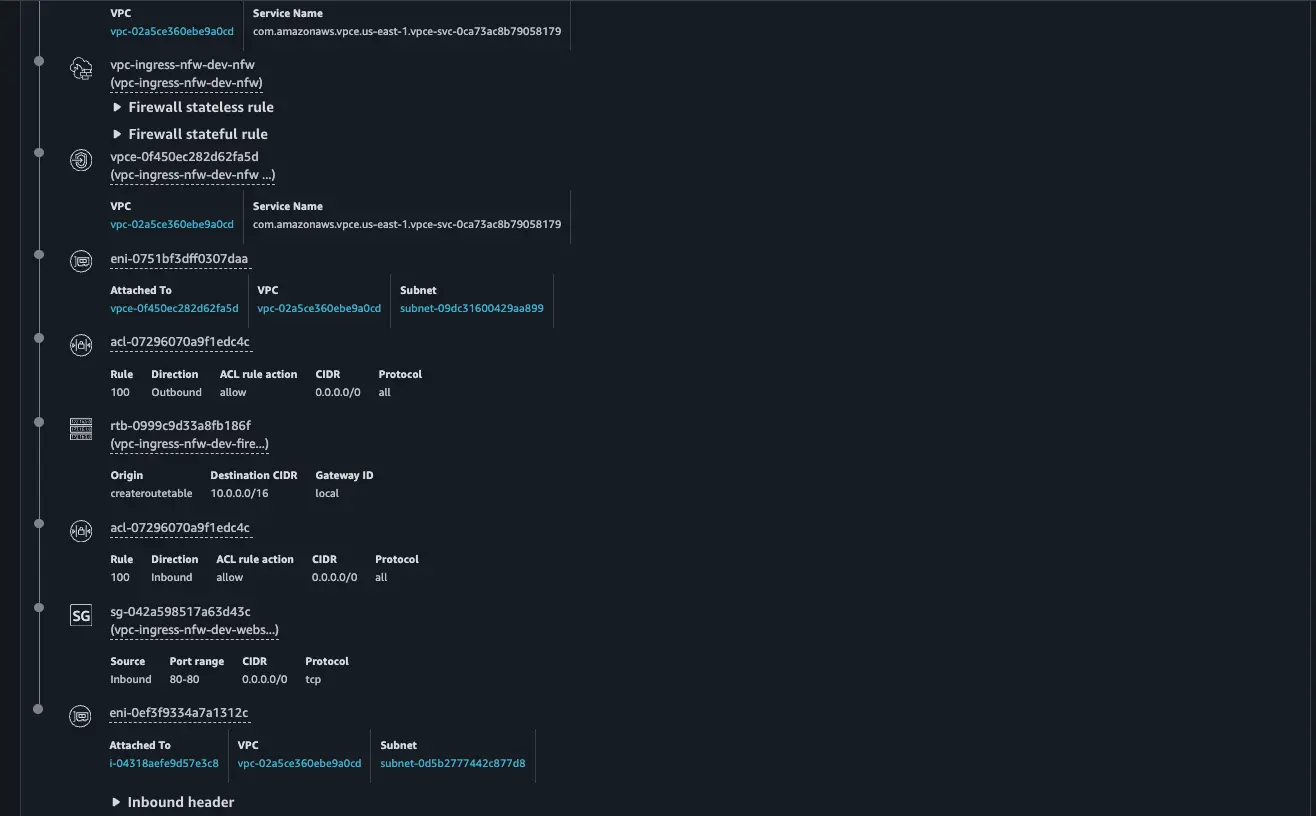
Ingress traffic from the internet, destined for the web server, will be directed by the VPC ingress route table on the IGW to the AWS Network Firewall Endpoint for inspection.
resource "aws_internet_gateway" "main" {
  vpc_id = aws_vpc.main.id

  tags = local.igw_tags
}

resource "aws_route_table" "igw_ingress_rt" {
  vpc_id = aws_vpc.main.id

  # Route for webserver subnet traffic through firewall (VPC Ingress Routing)
  route {
    cidr_block      = local.webserver_subnet_cidr
    vpc_endpoint_id = local.firewall_endpoint_id
  }

  tags = local.igw_route_table_tags
}

# Binding the ingress route table to the IGW
resource "aws_route_table_association" "igw_ingress_association" {
  gateway_id     = aws_internet_gateway.main.id
  route_table_id = aws_route_table.igw_ingress_rt.id
}
Egress Path
It is important to maintain symmetrical traffic flows on the firewall, so Internet egress from the web server will be directed to the AWS Network Firewall’s Endpoint via a static route in the web server route table.
resource "aws_route_table" "webserver" {
  vpc_id = aws_vpc.main.id

  # Route to internet through firewall endpoint
  route {
    cidr_block      = "0.0.0.0/0"
    vpc_endpoint_id = local.firewall_endpoint_id
  }

  tags = local.webserver_route_table_tags
}
If the AWS Network Firewall inspection is positive, it will forward the traffic to the IGW
resource "aws_route_table" "firewall" {
  vpc_id = aws_vpc.main.id

  # Route to internet via IGW
  route {
    cidr_block = "0.0.0.0/0"
    gateway_id = aws_internet_gateway.main.id
  }

  tags = local.firewall_route_table_tags
}

resource "aws_route_table_association" "firewall" {
  subnet_id      = aws_subnet.firewall.id
  route_table_id = aws_route_table.firewall.id
}
Implementation Steps
Prerequisites
- AWS Management Console
- AWS CLI
- Git (to clone the repo)
- Terraform
Clone the Repo
git clone https://github.com/FonNkwenti/tf-vpc-ingress-nfw.git
cd tf-vpc-ingress-nfw
Initial Deployment
# Initialize Terraform
terraform init

# Review the execution plan
terraform plan

# Deploy the infrastructure
terraform apply -auto-approveAfter deployment, Terraform will output the public IP address of the web server.
Apply complete! Resources: 27 added, 0 changed, 0 destroyed.

Outputs:

ec2_instance_connect_command = "aws ec2-instance-connect ssh --instance-id i-04318aefe9d57e3c8 --region us-east-1"
web_url = "http://35.169.9.203"
webserver_instance_id = "i-04318aefe9d57e3c8"
webserver_private_ip = "10.0.2.211"
webserver_public_ip = "35.169.9.203"
➜  tf-vpc-ingress-nfw git:(main) ✗
Testing
Copy the web server url from the Terraform outputs and paste in a web browser. You should see a web page served from the web server.
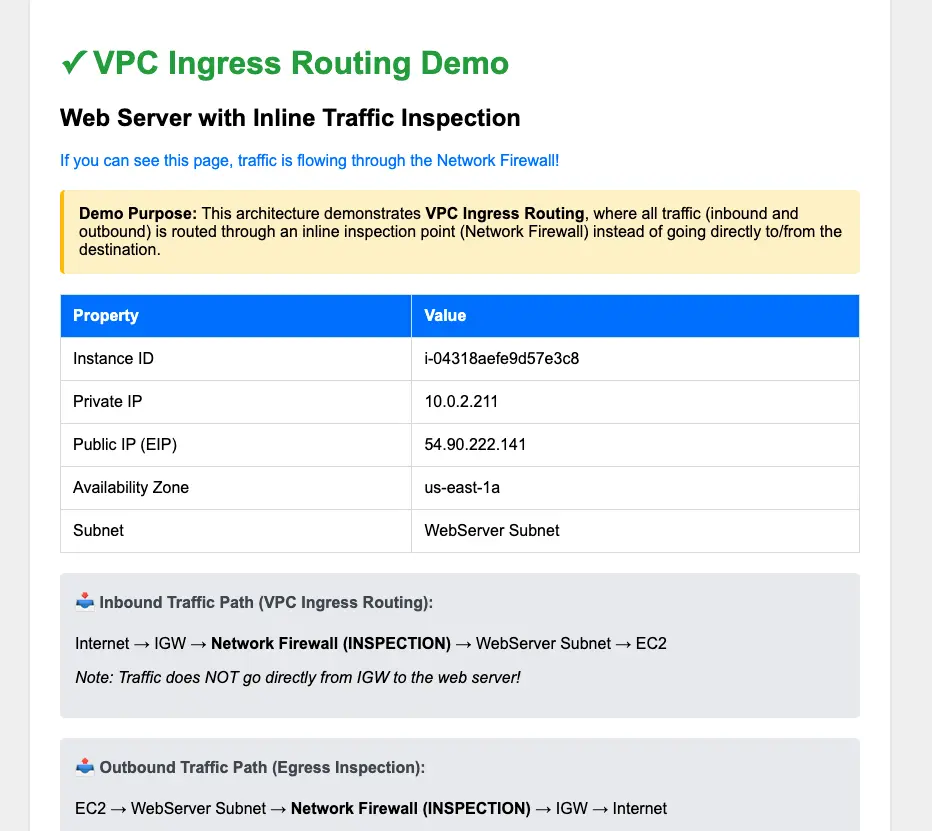
To see the path ingress traffic takes from the IGW via the Network Firewall's endpoint to the web server, run the reachability-ingress-test.sh script and head over to the VPC Reachability Analyzer Console to see the path details.
./reachability-ingress-test.sh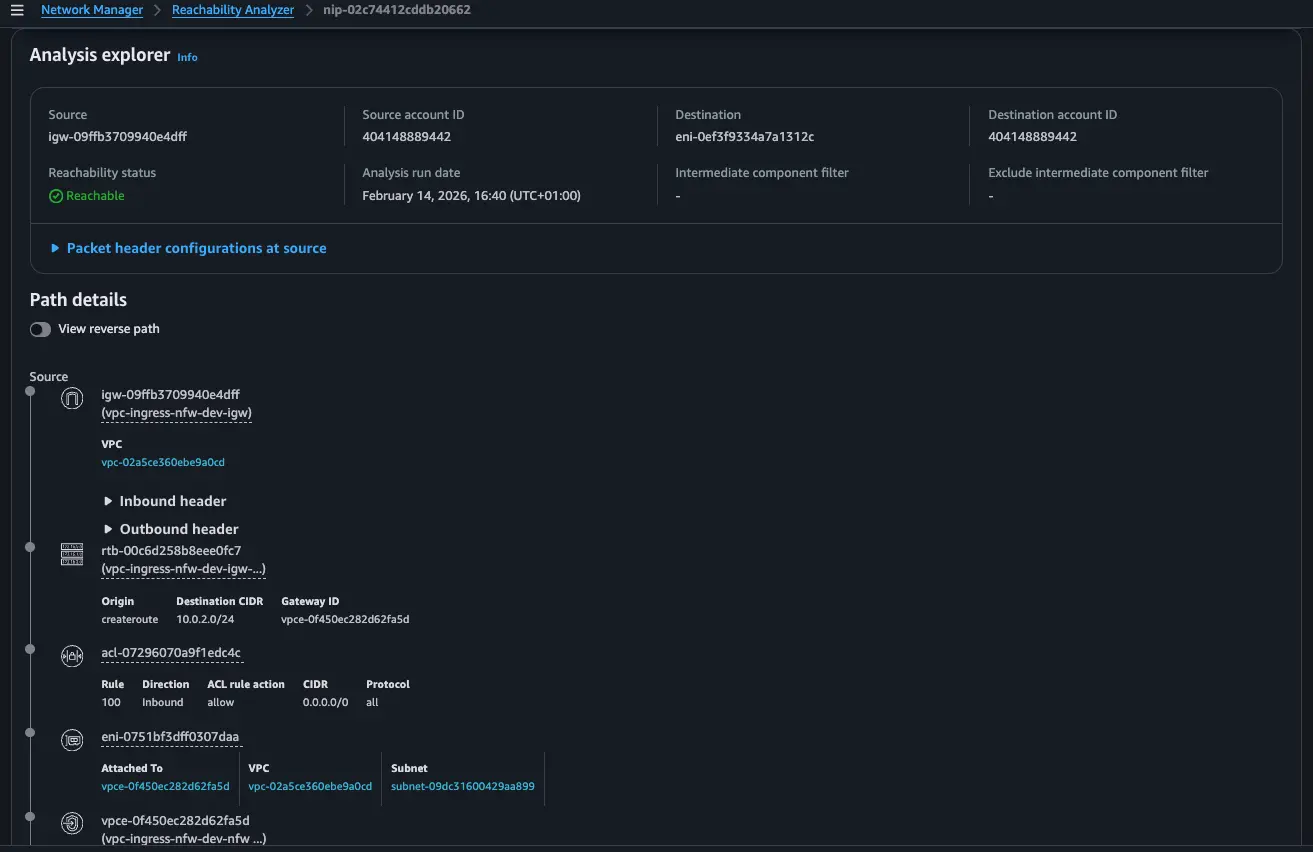
Conclusion
VPC Ingress Routing fundamentally changes how we think about securing inbound traffic in AWS. No more jumping through hoops with proxies or NAT chains just to get a proper look at what's coming through your front door. By attaching route tables directly to your Internet Gateways, you finally have that first-hop control point that traditional VPC architectures always lacked.If you're responsible for VPC security, ingress routing deserves a spot in your architectural toolkit. It is the only way to enforce ingress control in your Amazon VPC.
References
https://docs.aws.amazon.com/vpc/latest/userguide/igw-ingress-routing.html
https://docs.aws.amazon.com/network-firewall/latest/developerguide/arch-single-zone-igw.html


%20(1).svg)

.svg)