If we look back into not so distant history, we will see that computer systems have come a long way, from vacuum tubes and machine language programming to cloud infrastructure and Artificial intelligence. The tools are developing rapidly, and so is the demand to adopt new technologies and solutions. The way software systems and solutions are being built has changed significantly. Today, every seasoned individual or team architecting and building software solutions understands there is no such thing as calling your work “done” because we moved to an iterative and incremental process. It is not perfect, but to keep up the pace, we have to be able to move fast and adapt to any change. That’s why practicing agile methodologies and principles in software development has become standard today.
In theory, this sounds very reasonable and straightforward, but in practice, things quickly get out of control. The fast pace requires a series of tradeoffs due to complexity and issues we overlooked or failed to anticipate because of the constantly evolving environment. If we are not careful, those tradeoffs could introduce many problems, such as technical debt or significant security risks, to mention a few.
Security is always among the top priorities when developing systems. Privacy, compliance, and data integrity are the areas where very little or no compromise is allowed or possible. To address this, the teams are always looking for materials, whitepapers, best practices, and following tech talks to keep pace with the developments, threats, and solutions. The motivation for this article comes from the fact that it is very hard to find or filter advanced content among the proliferation of beginner-level content. If there is a paper addressing complex issues, it often comes as a highly theoretical study that takes time and addresses a broad number of use cases. We need more focused content that addresses real-world scenarios, case studies, examples, and objective evaluation of the complexity and challenges faced.
Managing secrets in the cloud is not new or uncharted territory. One topic rarely discussed is a real-world scenario regularly seen among large organizations and enterprises: the usage of hybrid cloud solutions. By hybrid solutions, we usually mean organizations using cross-cloud solutions or even part of the workloads running on-premise, where the communication between environments and services hosted needs to be secure and reliable.
This article provides a solution using best practices for securely sharing secrets between Microsoft Azure and AWS. It covers the E2E sharing workflow from secret creation to distribution, including a real-world scenario and demo solution with the provided source code.
Encryption keys, SSH credentials, and Private Keys and Certificates are outside the scope of this article.
What is Authentication
This process verifies a person's or machine's identity. Before granting access to any of the resources or services catalog, we need to know who is requesting access.
What is Authorization
While authentication confirms the requester's identity, authorization verifies that an authenticated user or service can access the required resource or operation. It’s worth noting that even unauthenticated users might sometimes be authorized to access certain parts of the system, so these two processes are not tightly coupled.
What is AWS Signature 4 or Sig4
Sig4 is an authentication protocol internally developed by AWS to provide data integrity for requests. This means that by using Sig4 to sign requests, we can be confident that the data hasn’t changed in transit. When accessing AWS programmatically, we need to provide an Access and Secret Key or temporary security credentials in the form of a token. With the help of Sig4, we can sign the request in the form of a hash to be sure that the data received at the destination are the same as they were at the source. Sig4 calculates the signature with the request body, headers, query parameters, secret access key, and timestamp. However, Sig4 does not provide encryption, so to make data encrypted in transit, we have to send data using the HTTPS protocol.
When the data arrives at the destination, If the signature is invalid, the request is rejected. Sig4 is using timestamps to prevent replay attacks. If the data has not arrived within 5 minutes, which is the default value, the request will be rejected. This timeout can be adjusted.
Developing a custom solution should be considered the last resort unless there is a reasonable justification. However, if for any reason (such as compliance, for example), you must have better control or add unique features that otherwise would not be possible.
You don’t need to understand all the logic behind it and the implementation details. We will not need that unless we are going to build some custom library or work with the languages or runtimes for which AWS SDK does not exist. We will use the Sig4 implementation that comes with AWS SDK to sign the requests coming from Azure to AWS.
What is Secret
In this context, the secret is sensitive information that requires restricted access and should not be shared with a broader audience except on a need-to-know basis. A secret can be an API Key, a set of credentials such as a username and password, a DB connection string, an OAuth token, or any information used to access secure systems.
Exposing any secret can lead to significant security risks, which could compromise security and allow unauthorized users or systems to access sensitive data in our system. So, we'll need to plan our approach, always considering best practices and possible risks.
Security is always the number one priority, but that does not mean it is ok to create bottlenecks or performance issues in our applications or the development process. Remember that security is everyone's responsibility and that regular audits, updates, or improvements to the process should be routine.
Before we dive into the details, let’s set the stage by defining some fundamentals.
What is Secrets Manager
A secrets manager is an application or service designed to store, manage, and access sensitive information like passwords, API keys, and database credentials. It protects secrets from unauthorized access. We can even find secret (or password) managers embedded in web browsers. Since security is one of the most critical aspects of software development, all major cloud vendors offer their solutions as a service. Many solid third-party services exist, but we will discuss Azure and AWS in this article.
Azure Key Vault
In summary, Azure Key Vault is a Microsoft Azure secrets manager. Using Entra ID (former AAD), It provides fine-grained access policies for controlling who or what has access to secrets and keys. It also manages certificates and cryptographic keys. We will not cover all the aspects and details of Azure Key Vault, such as its integrations with other Azure Services. The detailed documentation with examples is available on the Microsoft website.
https://learn.microsoft.com/en-us/azure/key-vault/general/basic-concepts
AWS Secrets Manager
AWS Secrets Manager is a managed service similar to Azure Key Vault. Although their features and implementation differ slightly, their purpose is the same: securely managing secrets, credentials, and access policies. AWS Secrets Manager provides automated secret rotation, encryption, and fine-grained access control to secrets. It is firmly built into the AWS ecosystem, meaning many services have built-in support.
https://docs.aws.amazon.com/secretsmanager/latest/userguide/intro.html
How to Keep the System Secure
Some ground rules for developing and deploying secure applications to the cloud are the same as those for traditional applications. It all comes down to common sense. Let’s create a foundational security checklist with some ALWAYS DO IT and NEVER DO IT!
This list is not final or exhaustive, as it can be developed further into more detail. The purpose of it is to create a basic checklist, while the actual implementation, as usual, depends on a use case. Even though the article is focused on managing secrets, it is hard not to mention some everyday things that are very important to keep our system secure.
Things We Should Always Do:
1. Use Secrets Managers
Secrets should always be stored using the cloud vendor's dedicated service, such as Azure Key Vault or Secrets Manager. However, using a third-party service that best meets our requirements is also ok, but the selection process for such service must be rigorous. The best practice is to always use short-lived credentials for any secure access, which means that the rotation of the secrets is strongly recommended to implement. It is a must-have. Also, we should never forget to audit access to our secrets to avoid unpleasant surprises or at least to be aware of any suspicious activity.
2. Enforce the Principle of Least Privilege
There is not much to say here. The rule of thumb is that no single user or resource should have more permissions than necessary. We must deny all by default and gradually add what is required.
3. Encryption and MFA
All the sensitive data must be encrypted end to end. What was a “nice to have” before is a must today. Multifactor authentication must be enforced for all users.
4. Secure CI/CD Pipelines
Finally, as a cherry on top, and probably the most complex part, is securing the CI/CD pipelines. Surprisingly, this is not often considered as too much of an issue. As a good starting point, I highly recommend visiting OWASP Top 10 CI/CD Security Risks which should give us an idea of what must be considered to secure our pipelines. It might change your point of view.
We Should Never:
1. Hard-code secrets
While this sounds obvious, it is not uncommon for developers to take shortcuts to meet the deadline. However, this is one of the most dangerous things to do. We must establish a strict review process and employ automated tools to detect secrets in code. This article does not discuss which tools are available or how to use them effectively. The rules for API keys, credentials, or any type of secrets are as follows:
- No secrets in code
- No secrets in environment variables
- No secrets in configuration files
- No secrets in any form or shape committed to the source control system
2. Create Overly permissive IAM Roles or Policies.
Never add a wild card such as * to the IAM roles. This point goes hand in hand with the “do” least principle privilege. Overly permissive IAM roles are among the most dangerous when assigned to computing resources such as, but not limited to, Lambda functions. Various malicious attacks lurk, and they might get access to our internal system, even if we think that all the security measures are in place. We have to plan for such a scenario. If the hijacked Lambda function's execution role allows only a minimal set of permissions, the blast radius is consequently minimal.
However, we are in big trouble if our attached role is overly permissive, allowing all actions on all resources. Nothing prevents the attacker from creating an administrator user and taking control of the entire AWS account.
Even less dramatic actions can have serious consequences. Considering the overly permissive execution role for the Lambda function that is supposed to query the database, which was a target of the successful SQL injection attack, could lead to unexpected data loss.
3. Use Default Configuration, Disable Encryption, or Allow Unrestricted Network Access
Never disable security measures, even temporarily, for testing purposes! End-to-end encryption must always be active, meaning the data is always encrypted, whether it is persisted or in transit. Unrestricted network access must also be prohibited at all times.
This list can expand to several pages if we want to add more details about testing, logging, alarms, incident response, audits, etc. Still, it should be an article about a narrow topic, not a security handbook. Keeping the system secure is a never-ending process. We must always be aware and in control of system behavior and never stop looking for ways to improve it.
How to Securely Share Secrets on AWS
The Secrets Manager service is recommended for sharing secrets on AWS. It is the most secure method and follows compliance standards such as SOC, PCI DSS, HIPAA, and ISO.
https://docs.aws.amazon.com/secretsmanager/latest/userguide/secretsmanager-compliance.html
However, secrets could be stored within the Systems Manager Parameter Store, which has fewer features and different configurations. Unlike the Parameter Store, which requires custom workflows, Secrets Manager supports automated key rotation for RDS, Redshift, and DocumentDB credentials and supports AWS KMS service.
This article's targets are AWS Secrets Manager and Azure Key Vault.
In the next paragraph, we will discuss one typical pattern for accessing RDS on AWS: using shared credentials stored securely in SecretsManager.
Creating and Sharing DB Credentials on RDS
Credentials should not be manually generated when creating a new RDS instance. Most IaC tools support automatically generating secure passwords. For example, in CloudFormation, we can use SecretsManager resources to create a password string with the required complexity. Alternatively, we can use a custom resource to generate a password.
After setting up the credentials, they should be stored in the AWS Secrets Manager. Depending on the requirements, we can use the AWS KMS service with either a self-generated or AWS-managed key.
Although it is optional, automatic secret rotation is highly recommended. We can configure Secrets Manager to rotate the credentials automatically at a specified interval as it is supported out of the box. This process involves setting up a Lambda function that interacts with the RDS instance to update the password and store the new value in Secrets Manager.
How to Access Secrets in AWS Secrets Manager
Developers should not have direct access to RDS secrets stored in the AWS Secrets Manager. Instead, they should develop locally using local databases. If developers need to access stored secrets, they should obtain temporary credentials using AWS CLI, AWS SDK, or AWS IAM Identity Center.
Another way to access the database on AWS RDS is “passwordless” access. We must enable IAM authentication on the RDS to access it this way. However, this process comes with some additional considerations or complications. Not all database engines on RDS support IAM authentication, so before planning our architecture, it is always a good idea to consult the official documentation for additional information. For some desktop tools, we need to configure an access token using a custom script or series of AWS CLI commands, but that goes out of the scope of this article.
Services can use the AWS SDK to programmatically retrieve secrets at runtime without exposing them in code. Another option is to use environment variables, NOT TO STORE SECRETS, but rather to reference them using Parameter Store.
We should always consider implementing a caching mechanism for secrets stored in the secrets manager to avoid unnecessary API calls and reduce costs. The AWS SDK client supports this out of the box for many supported languages. However, the AWS-provided extension also allows us to cache secrets in the Lambda service. As usual, we should never forget to follow the principle of least privilege when assigning execution roles for our helper Lambda functions.
What About Hybrid and Cross-Cloud Setups?
From all the above, it is clear that managing secrets is straightforward while working within the boundaries of a single cloud provider. We store and encrypt secrets using the secrets manager and apply best practices to access them. Last but not least, we must periodically rotate secrets automatically. We have many tools, SDKs, and integrations that could make our lives easier.
Now that we have discussed exclusive cloud vendors, we cannot ignore the fact that things are not that simple in real-world scenarios. We often see hybrid on-premise-to-cloud setups or cross-cloud usage in the enterprise world. Let’s get out of our comfort zone and discuss more complex use cases, such as sharing secrets between Azure and AWS, which is the main focus of this article.
If you have never seen such a setup before, consider the following scenario:
Secrets Guru Inc. manages its Active Directory in the Azure Cloud. This service used to be called Azure Active Directory (AAD), but nowadays, it is known as Entra ID. Entra ID serves as an SSO identity provider for many in-house systems. It also supports the OAuth2 Client Credentials Flow, generating Client IDs and Client Secrets for backend-to-backend integrations.
The company uses multiple Azure services that suit its business requirements well. All client applications and backend-to-backend integrations must be registered on the Entra ID to generate the relevant API Keys or Client ID and Client Secret, which can then be used in the OAuth2 Client Credentials Flow to exchange for the token.
The second part of the company infrastructure is hosted on AWS. Many services access cross-cloud resources such as databases, APIs, or external third-party services. All these services require some API Keys or credentials to make relevant requests.
You ask the right questions if you wonder why we can’t keep secrets where they “naturally” belong. Sometimes, this is the best solution, so all the planning is done upfront. If the secrets stored on Azure are not frequently accessed, we can probably get away with using SDK through a direct connection. Adding some extra latency is not a problem.
However, there are several valid cases where we should consider replication, even though it adds a bit of complexity. This complexity comes from the required implementation, as there are always challenges like failures, version conflicts, and consistency. However, as you will see from the upcoming example, we will utilize both cloud vendors' tools to tackle those challenges.
Suppose Secrets Guru Inc. has long-established security standards and procedures, according to which all secrets and passwords must be generated on Azure Entra ID, regardless of whether the service using those secrets is hosted on Azure or AWS. However, the real issue arises with the AWS services that support only AWS Secrets Manager and do not support Azure Key Vault and Hybrid solutions.
The first thing that comes to mind is implementing a pulling mechanism on the AWS side and caching the secrets. In these cases, we have to evaluate if we can live with the delays in secret rotations, what kind of secrets we are dealing with, whether we need high availability, and how often secrets are retrieved.
If the answers to these questions do not describe expected behavior, we should seriously consider replication, but with the push mechanism. This way, we can provide near real-time updates to the AWS Secrets Manager whenever a change occurs on the Azure Key Vault. This setup could lead to significant cost savings and a much simpler service setup on the AWS side.
Another use case for replication is when low latency is considered the highest priority. In this case, we cannot rely on network stability and possible connectivity breaks between Clouds and (possibly) data transfers between distant regions. We can and should also implement secrets caching in this case, whether we are or not using replication, because caching secrets not only provides the fastest possible access to the value but also reduces costs. With that in mind, we should never forget to think about the possible stale data (secrets) if the cache is not refreshed when secrets change. There are some common patterns like TTL or, even better, updating the cache when the secret is updated. Our sample solution will address this issue as well.
Now is the perfect moment to mention that replicating secrets could significantly contribute to high availability. If we combine caching with replication, possible network latency, distance, or connection instability will not be an issue. Finally, replicating secrets might be required for compliance reasons.
We must use strong encryption and establish a secure communication channel for sensitive data. Encryption is almost always one of the foundational requirements for different compliance standards, so we must consider how to implement it. However, since the Secrets Manager on AWS follows many compliance standards, it could be very efficient and cost-effective to utilize what is already available.
https://docs.aws.amazon.com/secretsmanager/latest/userguide/secretsmanager-compliance.html
We have discussed a lot so far. No matter how simple things are at first sight, security is always complex and time-consuming to implement. The main takeaway is always to plan infrastructure and security carefully. Remember that this process can never be called done, as we must continuously monitor, observe, update, and evolve our system to keep up with the highest standard. With that, let’s move on to implementing caching and replication.
Caching AWS Secrets Manager Secrets
One key point of this article and overall solution is caching secrets. Anyone dealing with data of any kind and performance related to accessing that data is familiar with the term “cache.” For those who are not, let’s explain why it is important in this practical example. So, why do we need a cache in the first place?
Imagine that we have a database that is frequently accessed. For example, our blog posts are stored in the database. Our blog is very popular, so the articles are accessed thousands or even millions of times a day, especially the most recent ones. Every time we want to get those articles, we need to make a request to the database and then present it to the users. If we have to do this a million times a day, we are putting our servers under pressure. Heavy reads or writes always come with some cost. We want to be able to serve these requests, meaning that our database must be able to handle millions of reads. Otherwise, our site will face downtime. One possible option is to invest money and scale our database servers horizontally or vertically to solve our issues. Indeed, that will solve the problem, but architecting solutions is not always related to the technical aspect. There is always that “annoying” thing called cost efficiency. Even if we have the budget, we need to consider whether spending it here is necessary or if it could be saved and invested elsewhere where it is more needed.
If you follow carefully, you realize we serve the same data repeatedly. It would be great to keep this data ready and quickly accessible instead of querying the database on every request. This technique is called caching. There are many techniques for many use cases, which are usually very complex. Since database caching is not a subject of the article, let’s pretend, for the sake of the example, that it is good enough to keep the blog article in memory for fast access. If we do this on the first request, then for every subsequent request, our blog application will first check if there is an article with the request ID in memory. If yes, it will return it from there without doing a roundtrip to the database. If we repeat the same request a million times, 999 999 requests will be served from memory. This technique releases the pressure from the database. Now, we don’t need such a large cluster after all. The complexity now comes from the memory size limitation, TTL (time to live for the data cached), updating cache if the article changes, etc.
If you are wondering why we are deviating from the topic of secrets to discuss the database cache, I have a surprise for you. Secrets Manager, among other things, is a secure key-value store, making it a purpose-built database to store sensitive data. Caching secrets is no different than caching any other kind of data, except that secrets must always be stored securely. With that in mind, it is not important what your data source is. If there are subsequent requests to the backend system, which must make some round-trip to get the same data, we should always consider whether we need caching.
So, should we cache secrets from Secrets Manager? Unfortunately, I have the most dreadful answer that anyone looking for a solution can get: it depends. Even though it is tempting to leave this as a cliffhanger, let’s address this issue as a part of our solution using everything we have mentioned. Yes, we mentioned many things, but now is the time for everything to come together and become useful.
First, accessing the secret value from AWS Secrets Manager has a price tag. Although the cost is small, application requests could scale to thousands or even millions, making it significant. When this becomes the case, the answer is YES. We should cache the secrets. Of course, the opposite case is when the secret is not accessed very often, and the cost does not represent significant value. It is probably not worth implementing a cache mechanism in such a case.
Can you guess the answer to the question, "How do we cache secrets?" You are correct: it depends. Depending on the system architecture, there are many approaches to this, but one thing is non-negotiable: the secret must be stored securely.
Let’s discuss the serverless way to do it. On AWS, Lambda functions are one common way to access secrets. In this case, we already mentioned a no-go: loading the secret value into the environment variable. Then, what options do we have? We can read the secret value using the AWS SDK. There is nothing wrong with reading secret values like this, but this is just a first step, as we already mentioned that we do not want to read the value on each request. We want subsequent requests to read from the cache. We could come up with our clever custom solution. Assuming that everything works well, kudos, we achieved the goal. However, that was probably not the most cost-effective way of doing it, considering the resources invested to develop it and the resources required to maintain it.
This situation is one of those cases where I recommend not reinventing the wheel in creating custom solutions when reliable sources maintain well-established patterns. In the concrete case, we are talking about AWS. You are welcome if you still want complete control and to handle the cache independently. Like everything else, do this with security in mind and consider all the trade-offs. There are plenty of options at your disposal. In this article, we will focus on two main options available out of the box:
- Use the AWS SDK library cache where supported
- Use Lambda Extension
The first option is straightforward. The AWS documentation describes all the details of the approach. You are good to go if your Lambda runtime supports caching out of the box as part of the library. AWS SDKs for languages like Python and Java commonly include built-in caching for Secrets Manager. Just access the secrets as you would normally do and let the library handle the cache.
https://docs.aws.amazon.com/secretsmanager/latest/userguide/retrieving-secrets.html
If our Lambda runtime does not support cache out of the box, we can use the second option. This option utilizes Lambda extensions, a powerful mechanism for integrating Lambda with external systems or adding and sharing internal features.
Lambda Extensions
There are two types of extensions: internal and external. External extensions run in a separate process. Once started, when we extend Lambda with an external process, it continues running as an individual process. It persists across invocations as long as the execution environment is reused. When the execution environment is destroyed, so is the external extension process.
We are more interested in the internal extension, which runs within the Lambda function runtime. This extension type is one of the tools AWS uses to implement caching secrets for runtimes that do not support caching within the SDK Library. AWS makes these extensions available for each supported region. Relevant ARNs can be found in the AWS documentation. One thing to note is that AWS uses versions for those extensions to maintain compatibility and not introduce breaking changes for the existing workloads. Also, this very same extension works for the Parameter Store and the Secrets Manager, and last but not least important is that secrets are NEVER PERSISTED to disk or database. They remain cached in memory, which aligns with best practices.
Here is an example of the NodeJS Lambda using the extension in the “eu-west-1” region. Assuming we are using the AWS CDK framework with TypeScript support as IaC, the typical setup might look like this:
import { join } from 'path';
import { CfnParameter, Duration } from 'aws-cdk-lib';
import { Code, Function, LayerVersion, Runtime } from 'aws-cdk-lib/aws-lambda';

const layerVersionArnParameter = new CfnParameter(this, 'LayerVersionArn', {
	type: 'String',
	description: 'ARN of the AWS Parameters and Secrets Lambda Extension layer',
	default: 'arn:aws:lambda:eu-west-1:015030872274:layer:AWS-Parameters-and-Secrets-Lambda-Extension:12',
});

const parametersSecretsExtensionLayer = LayerVersion.fromLayerVersionArn(
	this,
	'ParametersSecretsExtensionLayer',
	layerVersionArnParameter.valueAsString
);

const lambda = new Function(this, 'lambda’', {
	runtime: Runtime.NODEJS_24_X,
	code: Code.fromAsset(join(__dirname, 'lambda')),
	handler: 'index.handler’,
	memorySize: 512,
	timeout: Duration.seconds(6),
	environment: {
		PARAMETERS_SECRETS_EXTENSION_CACHE_ENABLED: 'true',
		PARAMETERS_SECRETS_EXTENSION_CACHE_SIZE: '1000',
		PARAMETERS_SECRETS_EXTENSION_HTTP_PORT: '2773',
		PARAMETERS_SECRETS_EXTENSION_LOG_LEVEL: 'info',
		SECRETS_MANAGER_TTL: '300',
		layers: [parametersSecretsExtensionLayer],
	}
});
CDK Example
export const getSecret = async (secretName: string): Promise<{ username: string, password: string, host: string }> => {

	const port = process.env.PARAMETERS_SECRETS_EXTENSION_HTTP_PORT || '2773';
	const endpoint = `http://localhost:${port}/secretsmanager/get?secretId=${secretName}`;
	const headers = {
		'X-Aws-Parameters-Secrets-Token': process.env.AWS_SESSION_TOKEN || '',
	};

	const response = await fetch(endpoint, { headers });
	const responseJson = await response.json();
	const secret = JSON.parse(responseJson.SecretString);
	return secret;
}
JavaScript getSecret helper with native Fetch
export const handler = async () => {
	try {
		const secret = await getSecret('/rds/credentials');
			await mysql.createConnection({
			host: secret.host,
			user: secret.username,
			password: secret.password,
			… the rest of the code
		});
	} catch (error: any) {
		console.error('error occurred so do something about it’, error);
		… the rest of the code
	}
};
Lambda getSecret from store or cache
As for the TLDR version of this functionality, the most important things to remember are:
- Lambda extension exposes an HTTP endpoint that can retrieve a secret (or parameter) without using the SDK.
- The overall setup of the extension can be controlled by the extension environment variables, including port, cache size, TTL, etc.
- The extension does not store the secret anywhere on the hard drive or database; it keeps it only in memory during the Lambda runtime environment's lifecycle.
- The extension ARN for each supported region can be found in the AWS docs
- Using the extension is the recommended way to cache secrets when the runtime SDK library does not support caching out of the box
- The extension can be invoked only in the INVOKE phase of the Lambda operation and not during the INIT phase. The INVOKE phase is when the Lambda processes the request/event, while the INIT phase is when the environment is initializing.
- Lambda logs extension operations into the CloudWatch
The parameter store and secrets cache extension can dramatically improve cost efficiency and performance, especially when frequent access to secrets is required. We should always favor using this approach to cache secrets unless the runtime SDK library supports the caching out of the box or the secrets are not frequently accessed, making this effort an overkill because the influence on the performance or cost will be insignificant.
The official documentation provides a more comprehensive description of all the features.
https://docs.aws.amazon.com/secretsmanager/latest/userguide/retrieving-secrets_lambda.html
Azure Key Vault Replication to AWS Secrets Manager
As we mentioned, in the example scenario, Azure Entra ID is used for service-to-service authentication, meaning the secrets will be generated on the Azure side. Since these secrets must be available on AWS, we must establish a mechanism to securely replicate them without using messengers, emails, or other insecure channels.
Although most readers of this article know why these channels are insecure, let’s briefly walk through some of the basics for those who still have doubts. We never want to send secrets over channels that are not end-to-end encrypted. Some messengers or email services, even though most nowadays support it, may not implement end-to-end encryption.
When sending plain text passwords over email or instant messaging, the surface area for an attack increases rapidly. Email accounts and the people who use them are prone to phishing attacks. Gaining access to a real person's account or tricking them into sharing passwords through spoofed accounts or domains is much easier than gaining access to a private network and going through several layers of security to access the encrypted password.
The risk of the recipient machine being compromised or infected by malware is beyond an acceptable level. Even naive things like accidental forwarding, sharing, or exposing secrets represent real threats to the system’s security.
There is much more to add, but these few points should convince everyone to stop doing it if this is the practice. So, instead of wasting time on how not to do it, let’s discuss how it is supposed to be done.
We have two options for replicating secrets: a pull or push mechanism. The following article explains the pull mechanism and suggests a solution for implementing it from the AWS perspective. It also advocates for AWS-provided solutions over third-party tools, which might not always be the best way to resolve real-world problems.
With the pull mechanism, we would periodically utilize Event Bridge and Lambda to retrieve secrets. This approach has the benefit of not needing to update the Azure side, but the biggest downside is that there will be some delays between created/updated secrets and what is stored on AWS Secrets Manager. The possibility of using stale data within a certain period or time window is very high, which might lead to temporary issues accessing resources for which those secrets are required.
We already mentioned that this article would focus on replicating secrets in real-time. The push mechanism is recommended and the best choice for this use case.
If we pause to think a little bit about this replication process, we will understand that it is naturally event-driven. Event-driven architecture has many definitions, but in a nutshell, it always involves executing code when an event occurs. A combination of Azure Event Grid and Azure Functions makes the perfect team to support this type of architecture on Azure. If you are more familiar with AWS services, then think of it as EventBridge and Lambda.
Azure Event Grid supports “SecretNewVersionCreated” and “SecretUpdated” events on the Azure Key Vault. When we create this integration, Azure Functions can subscribe to these events. The function can use the AWS SDK to connect to the Secrets Manager on the AWS Account and write the secrets accordingly.
The given approach will provide near real-time replication and reduce traffic between Azure and AWS because it will trigger only when required. Implementing this function requires minimal code and is straightforward.
That is all related to the Azure side, but what about the AWS and how to establish secure connection between the two? We are about to find out as there is more than one option.
Solution Implementation
Let's compare the solution described with the provided architectural diagrams.
.png)
In Option 1, we first noticed an API Gateway and Lambda function on the AWS side, which had not been mentioned before. As we can see in the diagram, those three components are marked as optional since the Azure Function can write directly to the Secrets Manager if proper access is granted. In the real-world scenario, even though they can be helpful in some cases, we would omit them as redundant. They are here strictly for demo purposes.
Establishing a private network and communication between two clouds is a typical setup in a real-world scenario. Anyone who wants to try this implementation of replicating secrets, especially in their private account, does not need to set up a production-ready network and the costs that go with it. In this example, the Azure function will call a “set secret” endpoint over the internet (encryption in transit is mandatory), triggering the Lambda function on AWS, which will update the secrets manager. It realistically demonstrates everything described while removing unnecessary costs and the complexity of the network setup. You would need AWS Signature 4 described earlier to make this approach secure.
.png)
If we look into the second solution we notice that there is no intermediate Lambda or any other compute service. Azure Function can write directly into the Secrets Manager, but it has to be authenticated and authorized to do so. For that purpose we are going to use relatively new IAM Service called Roles Anywhere.
Before we get our hands dirty, let’s choose the tools for the task. Although most tasks can be finalized using the console and the CLI, we want to automate everything. For this purpose, we want to use Infrastructure as Code (IaC). The real question is which platform, framework, or tool best fits our requirements. Usually, I prefer not to mix cross-cloud infrastructure within the same project or repository. This approach allows clear separation and usage of the native tools that are better tailored for specific cloud providers.
However, in this case, going with something more universal like OpenTofu should serve us well. OpenTofu is an IaC tool that uses declarative language and supports multi-cloud developments. It is a fork of the well known Terraform, but maintained by the community. Therefore in the following text we will use tofu/terraform interchangeably as it works with both.
If you disagree with this approach, have a different preference for a multi-cloud IaC tool, or even want to deploy with multiple platform-specific IaC such as Bicep, ARM templates, CloudFormation, or even CDK. In that case, you are more than welcome to do it. If you feel more comfortable with those tools or have another reason, you should do it. The most important thing is not to do it manually. Everything else is a matter of preference.
Let’s start the Terraform project by building the Azure template. This article is not a Terraform tutorial, so we will briefly cover the basics required for deploying our solution. The complete source code for this demo is available on Serverless Guru's GitHub.
We will also add additional Lambda function that is not on a diagram just to demonstrate how caching secrets works.
Our project is organized into multiple files for better clarity and readability. The infrastructure is divided into the following files:
- azure_function_code/
- main.tf
- outputs.tf
- provider.tf
- variables.ts
- versions.tf
The names are very descriptive. We have separated shared variables and outputs into separate files for easier maintenance. We also have two subfolders containing NodeJS code for the Azure and AWS Lambda functions.
Finally, to deploy our solution, we must log in to Azure using the Azure CLI (az login) and create a credential profile for the deployment on AWS. Those steps should be converted and added to the CI/CD pipeline if we discuss the production deployment.
- https://registry.terraform.io/providers/hashicorp/azurerm/latest/docs/guides/azure_cli
- https://awscli.amazonaws.com/v2/documentation/api/latest/reference/configure/index.html
- https://learn.microsoft.com/en-us/cli/azure/install-azure
- https://opentofu.org/docs/intro/install/
Before we move to the testing solution step, let’s do a quick inspection of what’s in the architecture diagram and what we have in our Terraform code. We will focus only on the important components.
On the Azure side, we must create a Key vault, System Topic, and Function subscription. These are the relevant parts of the code:
resource "azurerm_key_vault" "kv" {
  name                = local.key_vault_name
  location            = azurerm_resource_group.rg.location
  resource_group_name = azurerm_resource_group.rg.name

  tenant_id = data.azurerm_client_config.current.tenant_id
  sku_name  = "standard"

  rbac_authorization_enabled = true

  purge_protection_enabled   = true
  soft_delete_retention_days = 7

  tags = var.tags
}
Key Vault Terraform
resource "azurerm_eventgrid_system_topic" "kv_topic" {
  name                = local.system_topic_name
  location            = azurerm_resource_group.rg.location
  resource_group_name = azurerm_resource_group.rg.name

  source_resource_id = azurerm_key_vault.kv.id
  topic_type         = "Microsoft.KeyVault.vaults"

  tags = var.tags
}

resource "azurerm_eventgrid_system_topic_event_subscription" "kv_to_func" {
  name                = local.eg_sub_name
  system_topic        = azurerm_eventgrid_system_topic.kv_topic.name
  resource_group_name = azurerm_resource_group.rg.name

  included_event_types = [
    "Microsoft.KeyVault.SecretNewVersionCreated",
    "Microsoft.KeyVault.SecretUpdated"
  ]

  azure_function_endpoint {
    function_id = "${azurerm_linux_function_app.func.id}/functions/${var.function_name}"
  }

  retry_policy {
    max_delivery_attempts = 30
    event_time_to_live    = 1440
  }

  depends_on = [
    azurerm_role_assignment.kv_secrets_user
  ]
}
EventGrid System Topic with Key Vault as an EventSource
resource "azurerm_linux_function_app" "func" {
  name                = local.function_app_name
  location            = azurerm_resource_group.rg.location
  resource_group_name = azurerm_resource_group.rg.name

  service_plan_id            = azurerm_service_plan.plan.id
  storage_account_name       = azurerm_storage_account.sa.name
  storage_account_access_key = azurerm_storage_account.sa.primary_access_key

  https_only = true

  identity {
    type = "SystemAssigned"
  }

  zip_deploy_file = data.archive_file.func_zip.output_path

  site_config {
    application_insights_key               = azurerm_application_insights.ai.instrumentation_key
    application_insights_connection_string = azurerm_application_insights.ai.connection_string

    application_stack {
      node_version = "22"
    }
  }

  app_settings = {
    "FUNCTIONS_WORKER_RUNTIME" = "node"
    "AzureWebJobsStorage"      = azurerm_storage_account.sa.primary_connection_string
    "WEBSITE_RUN_FROM_PACKAGE" = "1"
    "KEY_VAULT_URI" = azurerm_key_vault.kv.vault_uri
    "AzureWebJobsFeatureFlags" = "EnableWorkerIndexing"
  }

  tags = var.tags
  ... visit the GitHub repository to see the rest of the settings
}
Function App with the Azure Function running directly from the Package
resource "azurerm_eventgrid_system_topic_event_subscription" "kv_to_func" {
  name                = local.eg_sub_name
  system_topic        = azurerm_eventgrid_system_topic.kv_topic.name
  resource_group_name = azurerm_resource_group.rg.name

  included_event_types = [
    "Microsoft.KeyVault.SecretNewVersionCreated",
    "Microsoft.KeyVault.SecretUpdated"
  ]

  azure_function_endpoint {
    function_id = "${azurerm_linux_function_app.func.id}/functions/${var.function_name}"
  }

  retry_policy {
    max_delivery_attempts = 30
    event_time_to_live    = 1440
  }

  depends_on = [
    azurerm_role_assignment.kv_secrets_user
  ]
}
Azure Function subscription to the Topic
Full source code is available on GitHub. This is what it looks like on the Azure Portal after the deployment.
.png)
.png)
What is left is to create certificate on AWS side that we will use to get temporary credentials and assume role that will allow create and update of the secrets in the Secrets Manager. Small, but important note! If you are wondering why we have to do this manually, isn’t the terraform able to provision all of this, you are again asking the right question. Well, yes, we could, but then the private keys would stay written into the session which is insecure. We don’t want our secrets to be physically written anywhere except in the Secret Manager/Key Vault store.
➜  mkdir certs
➜  cd certs
➜  openssl genrsa -out client.key 2048
➜  openssl req -new -key client.key -out client.csr -subj "/CN=kvrep-azurefunc"
Now, we go to the AWS Private CA Authority and create a private Certificate Authority.
.png)
Next step is to install Root CA Certificate so it can issue private certificates.
.png)
If all goes well, you should see the following screen:
.png)
Now that we have PCA created and installed, we need to take that ARN, so we can issue the certificate.
➜  REGION="us-east-1"
➜  CA_ARN="arn:aws:acm-pca:REGION:ACCOUNT:certificate-authority/RANDOM_GUID"
➜  CERT_ARN=$(aws acm-pca issue-certificate \
  --region $REGION \
  --certificate-authority-arn "$CA_ARN" \
  --csr fileb://client.csr \
  --signing-algorithm "SHA256WITHRSA" \
  --validity Value=30,Type=DAYS \
--output text --query CertificateArn)Finally, retrieve the issued certificate and chain:
➜  aws acm-pca get-certificate \
  --region $REGION \
  --certificate-authority-arn $CA_ARN \
  --certificate-arn $CERT_ARN \
  --query Certificate --output text > client.crt.pem

➜  aws acm-pca get-certificate \
  --region $REGION \
  --certificate-authority-arn $CA_ARN \
  --certificate-arn $CERT_ARN \
  --query CertificateChain --output text > client.chain.pem
➜ lsYou should have the following files in your certs folder:
- client.chain.pem
- client.crt.pem
- client.csr
- client.key
Three of them need to be stored into the Azure Key Vault. Make sure that you get the correct Key Vault Name, which is in this example kvrep-kv-sm2zy9
➜  KV="kvrep-kv-sm2zy9"

➜  az keyvault secret set --vault-name $KV --name "aws-ra-key-pem"   --file "client.key"
➜  az keyvault secret set --vault-name $KV --name "aws-ra-cert-pem"  --file "client.crt.pem"
➜ az keyvault secret set --vault-name $KV --name "aws-ra-chain-pem" --file "client.chain.pem"The Azure Function will read aws-ra-cert-pem and aws-ra-key-pem (and, optionally, aws-ra-chain-pem), then invoke aws_signing_helper using credential-process to obtain short-lived AWS credentials.
We are almost there. It is time for some IAM Roles shenanigans. Let’s go to IAM Console and select roles from the menu. We are looking for the “Roles Anywhere”. Here we need to create the “Trust Anchor”, using the certificate authority we created earlier.
.png)
We will need to get “Trust Anchor” ARN after it is created.
.png)
After we are done with this step we need to go back to the IAM Roles and create Role that Trust Anchor will assume.
.png)
Don’t forget to put the correct Trust Anchor ARN from the previous step. Attach policy that allows actions on the secrets manager only in the us-east-1 region. You can narrow it down more in production, but for the demo it will serve the purpose.
.png)
Finally, create the profile to get the final ARN we need for the Azure Function authentication and authorization.
➜  aws rolesanywhere create-profile \
  --name kvrep-demo-profile \
  --role-arns arn:aws:iam::ACCOUNT_ID:role/YOUR_ROLE_NAME \
  --enabled \
  --region us-east-1
Get the AWS Signing Helper Binary.
https://github.com/aws/rolesanywhere-credential-helper/releases
We are now ready to test our authentication process.
➜  ./aws_signing_helper credential-process \
  --region us-east-1 \
  --trust-anchor-arn arn:aws:rolesanywhere:REGION:ACCOUNT_ID:trust-anchor/RANDOM_UUID \
  --profile-arn arn:aws:rolesanywhere:REGION:ACCOUNT_ID:profile/RANDOM_UUID \
  --role-arn arn:aws:iam::161728447039:role/cross-account-demo \
  --certificate client.crt.pem \
  --private-key client.key
The resulting JSON are credentials compatible with the AWS SDK. Let’s put this into our Azure function.
Ok, now we can go and write some code to implement our Azure Function.
import { SecretClient } from "@azure/keyvault-secrets";
import { DefaultAzureCredential } from "@azure/identity";
import { BlobServiceClient } from "@azure/storage-blob";
import {
  SecretsManagerClient,
  DescribeSecretCommand,
  CreateSecretCommand,
  PutSecretValueCommand,
} from "@aws-sdk/client-secrets-manager";

import { copyFile, writeFile, chmod } from "node:fs/promises";
import { tmpdir } from "node:os";
import { join } from "node:path";
import { execFile } from "node:child_process";
import { promisify } from "node:util";

const execFileAsync = promisify(execFile);

const KV_URI = process.env.KEY_VAULT_URI;
const STORAGE_CONN = process.env.AzureWebJobsStorage;
const CONTAINER = process.env.DEDUPE_CONTAINER || "kvrep-dedupe";

const AWS_REGION = process.env.AWS_REGION || "us-east-1";
const AWS_RA_TRUST_ANCHOR_ARN = process.env.AWS_RA_TRUST_ANCHOR_ARN;
const AWS_RA_PROFILE_ARN = process.env.AWS_RA_PROFILE_ARN;
const AWS_RA_ROLE_ARN = process.env.AWS_RA_ROLE_ARN;

const AWS_SECRET_PREFIX = process.env.AWS_SECRET_PREFIX || "";
const SIGNING_HELPER_PATH =
  process.env.AWS_SIGNING_HELPER_PATH || "/home/site/wwwroot/bin/aws_signing_helper";

const KV_CERT_NAME = process.env.AWS_RA_CERT_SECRET_NAME || "aws-ra-cert-pem";
const KV_KEY_NAME = process.env.AWS_RA_KEY_SECRET_NAME || "aws-ra-key-pem";
const KV_CHAIN_NAME = process.env.AWS_RA_CHAIN_SECRET_NAME || "aws-ra-chain-pem";

if (!KV_URI) throw new Error("Missing KEY_VAULT_URI");
if (!STORAGE_CONN) throw new Error("Missing AzureWebJobsStorage");

const kv = new SecretClient(KV_URI, new DefaultAzureCredential());
const blobService = BlobServiceClient.fromConnectionString(STORAGE_CONN);
const container = blobService.getContainerClient(CONTAINER);

let smClient;
let smClientExpiresAt = 0;

function normalizeSubjectToName(subject) {
  if (!subject) return undefined;
  const s = String(subject).trim();
  if (!s) return undefined;
  if (s.includes("/")) return s.split("/").filter(Boolean).pop();
  return s;
}

function parseNameVersionFromId(id) {
  if (!id) return {};
  try {
    const u = new URL(String(id));
    const parts = u.pathname.split("/").filter(Boolean);
    const i = parts.lastIndexOf("secrets");
    if (i >= 0 && parts.length >= i + 3) {
      return { name: parts[i + 1], version: parts[i + 2] };
    }
    return {};
  } catch {
    return {};
  }
}

async function tryMarkOnce(secretName, version, context) {
  context?.log(`tryMarkOnce: ensure container ${CONTAINER}`);
  await container.createIfNotExists();
  const key = `${encodeURIComponent(secretName)}/${version}`;
  const blob = container.getBlockBlobClient(key);
  try {
    context?.log(`tryMarkOnce: writing marker blob ${key}`);
    await blob.upload("", 0, { conditions: { ifNoneMatch: "*" } });
    return true;
  } catch (e) {
    if (e?.statusCode === 409 || e?.statusCode === 412) return false;
    throw e;
  }
}

async function getSecretsManagerClient(context) {
  const now = Date.now();
  if (smClient && now < smClientExpiresAt - 60_000) {
    context?.log("getSecretsManagerClient: using cached client");
    return smClient;
  }

  if (!AWS_RA_TRUST_ANCHOR_ARN || !AWS_RA_PROFILE_ARN || !AWS_RA_ROLE_ARN) {
    throw new Error(
      "Missing AWS Roles Anywhere env vars (AWS_RA_TRUST_ANCHOR_ARN, AWS_RA_PROFILE_ARN, AWS_RA_ROLE_ARN)"
    );
  }

  const helperTmpPath = join(tmpdir(), "aws_signing_helper");
  context?.log(`getSecretsManagerClient: copy signing helper to ${helperTmpPath}`);
  await copyFile(SIGNING_HELPER_PATH, helperTmpPath);
  context?.log("getSecretsManagerClient: chmod signing helper");
  await chmod(helperTmpPath, 0o755);

  context?.log("getSecretsManagerClient: fetch cert/key from Key Vault");
  const certPem = (await kv.getSecret(KV_CERT_NAME)).value;
  const keyPem = (await kv.getSecret(KV_KEY_NAME)).value;

  let chainPem;
  try {
    context?.log("getSecretsManagerClient: fetch chain from Key Vault");
    chainPem = (await kv.getSecret(KV_CHAIN_NAME)).value;
  } catch {
    context?.log("getSecretsManagerClient: chain not found, continuing");
    chainPem = undefined;
  }

  if (!certPem || !keyPem) throw new Error("Missing Roles Anywhere certificate/key in Key Vault");

  const certPath = join(tmpdir(), "aws-ra-cert.pem");
  const keyPath = join(tmpdir(), "aws-ra-key.pem");
  const chainPath = join(tmpdir(), "aws-ra-chain.pem");

  context?.log("getSecretsManagerClient: write cert/key temp files");
  await writeFile(certPath, certPem, { mode: 0o600 });
  await writeFile(keyPath, keyPem, { mode: 0o600 });
  context?.log("getSecretsManagerClient: write chain temp file (if present)");
  if (chainPem) await writeFile(chainPath, chainPem, { mode: 0o600 });

  const args = [
    "credential-process",
    "--region",
    AWS_REGION,
    "--trust-anchor-arn",
    AWS_RA_TRUST_ANCHOR_ARN,
    "--profile-arn",
    AWS_RA_PROFILE_ARN,
    "--role-arn",
    AWS_RA_ROLE_ARN,
    "--certificate",
    certPath,
    "--private-key",
    keyPath,
  ];
  if (chainPem) args.push("--intermediates", chainPath);

  context?.log("getSecretsManagerClient: exec aws_signing_helper");
  const { stdout, stderr } = await execFileAsync(helperTmpPath, args, {
    timeout: 20000,
    maxBuffer: 1024 * 1024,
  });
  if (stderr) context?.log(`getSecretsManagerClient: helper stderr ${stderr.trim()}`);

  context?.log("getSecretsManagerClient: parse credentials");
  const parsed = JSON.parse(stdout);

  if (!parsed?.AccessKeyId || !parsed?.SecretAccessKey || !parsed?.SessionToken) {
    throw new Error("Invalid credential-process output");
  }

  const expiration = parsed.Expiration ? new Date(parsed.Expiration) : undefined;
  smClientExpiresAt = expiration ? expiration.getTime() : now + 30 * 60_000;

  const credentials = {
    accessKeyId: parsed.AccessKeyId,
    secretAccessKey: parsed.SecretAccessKey,
    sessionToken: parsed.SessionToken,
    expiration,
  };

  context?.log("getSecretsManagerClient: create SecretsManagerClient");
  smClient = new SecretsManagerClient({ region: AWS_REGION, credentials });
  return smClient;
}

function mapSecretNameToAws(secretName) {
  return AWS_SECRET_PREFIX ? `${AWS_SECRET_PREFIX}${secretName}` : secretName;
}

async function upsertSecretAws(secretName, secretValue, context) {
  context?.log(`upsertSecretAws: init client for ${secretName}`);
  const sm = await getSecretsManagerClient(context);
  const awsName = mapSecretNameToAws(secretName);

  let exists = true;
  try {
    context?.log(`upsertSecretAws: describe ${awsName}`);
    await sm.send(new DescribeSecretCommand({ SecretId: awsName }));
  } catch (e) {
    if (e?.name === "ResourceNotFoundException") exists = false;
    else throw e;
  }

  if (!exists) {
    try {
      context?.log(`upsertSecretAws: create ${awsName}`);
      await sm.send(new CreateSecretCommand({ Name: awsName, SecretString: secretValue }));
      return;
    } catch (e) {
      if (e?.name !== "ResourceExistsException") throw e;
    }
  }

  context?.log(`upsertSecretAws: put value for ${awsName}`);
  await sm.send(new PutSecretValueCommand({ SecretId: awsName, SecretString: secretValue }));
}

export async function run(context, eventGridEvent) {
  try {
    context.log("run: start");
    const data = eventGridEvent?.data || {};
    const id = data.Id ?? data.id;
    const parsed = parseNameVersionFromId(id);

    const secretName =
      data.ObjectName ??
      data.objectName ??
      parsed.name ??
      normalizeSubjectToName(eventGridEvent?.subject);

    const version = data.Version ?? data.version ?? parsed.version;

    context.log(
      `run: parsed name=${secretName || "missing"} version=${version || "missing"} eventType=${
        eventGridEvent?.eventType || "unknown"
      }`
    );

    if (!secretName || !version) {
      context.log(`run: skip missing name/version subject=${eventGridEvent?.subject || "n/a"} id=${id || "n/a"}`);
      return;
    }

    const firstTime = await tryMarkOnce(secretName, version, context);
    context.log(`run: dedupe firstTime=${firstTime}`);
    if (!firstTime) return;

    context.log(`run: read secret ${secretName}@${version}`);
    const secret = await kv.getSecret(secretName, { version });
    const secretValue = secret.value;
    context.log(`run: secret value ${secretValue == null ? "missing" : "loaded"}`);
    if (secretValue == null) return;

    await upsertSecretAws(secretName, secretValue, context);

    context.log(`Replicated ${secretName}@${version} to AWS (${AWS_REGION})`);
  } catch (e) {
    context.log.error(e?.stack || e);
    throw e;
  }
}
Don’t forget to visit the main.tf file and app_settings section in order to update correct ARNs.
  app_settings = {
    FUNCTIONS_WORKER_RUNTIME = "node"
    AzureWebJobsStorage      = azurerm_storage_account.sa.primary_connection_string
    WEBSITE_RUN_FROM_PACKAGE = "1"
    KEY_VAULT_URI            = azurerm_key_vault.kv.vault_uri
    AzureWebJobsFeatureFlags = "EnableWorkerIndexing"
    DEDUPE_CONTAINER         = "kvrep-dedupe"
    AWS_REGION               = "${var.aws_region}"
    AWS_RA_TRUST_ANCHOR_ARN  = "arn:aws:rolesanywhere:${var.aws_region}:ACCOUNT_ID:trust-anchor/UUID"
    AWS_RA_PROFILE_ARN       = "arn:aws:rolesanywhere:${var.aws_region}:ACCOUNT_ID:profile/UUID"
    AWS_RA_ROLE_ARN          = "arn:aws:iam::ACCOUNT_ID:role/cross-account-demo"
  }
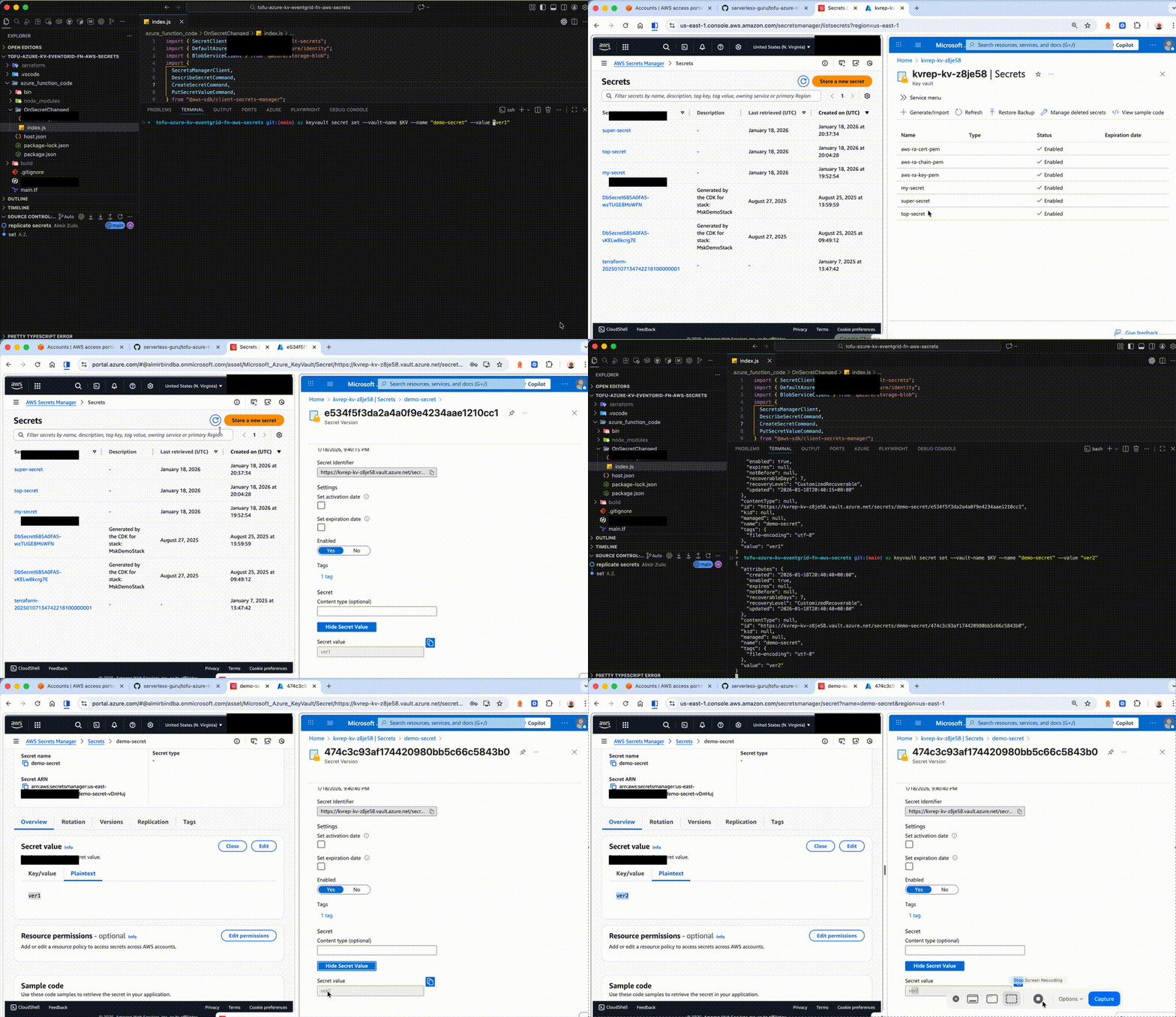
Finally, this is how it looks like in production:
Testing the Solution
Documenting Tests
The last step is to test and validate the solution provided. While it is possible to test manually using both consoles and CLIs, we will take a more professional and structured approach in the spirit of this article and best practices.
Sometimes, there is a misconception that documenting tests is strictly a QA responsibility if the QA team is available. This approach might be practiced in some teams, as the individual team organization is subjective and differs among companies. I disagree with this rigid approach because, in agile teams, security and quality are shared responsibilities. Developers and QA teams must become familiar with the product, understand the requirements, and work together to define test cases during sprint planning or refinements.
While there should be a clear ownership of the specific parts of the process, that does not mean that the other parts of the organization are excluded from everything. Collaboration must exist between the teams. Many companies fail at this, as ownership becomes a wall between the teams. This disconnection in the long term almost always leads to disaster or unexpected delays.
The shared responsibility model is not new or revolutionary. It is a proven way of working on a large scale. Even the lead cloud vendors, such as AWS, understand and practice this model.
https://aws.amazon.com/compliance/shared-responsibility-model/
Test Plan
Before implementing any automation or test scripts, let’s first understand our goals and expectations. The goal is to test the provided solution for near real-time secret replication from Azure Key Vault to AWS Secrets Manager. The tests will validate end-to-end functionality, including caching behavior in the Lambda extension. To do this efficiently, we will create a test plan document that describes our test strategy and scenarios.
While we are getting ready to create the test plan, let’s mention that many patterns, standards, and formats exist. You should choose whatever works best for you and your team, but it is highly recommended that you set the standard and follow the same pattern throughout the organization.
Our Test Plan will consist of the following elements:
- Test Scenario
- Test Cases
- Objective (what is the purpose of testing)
- Step-by-step guide to performing the test
- Expected outcome (success result)
- Edge cases (errors)
With all this information and introduction, we are ready to create the plan for our demo.
Test Scenario
Setup:
- Azure Event Grid triggers an Azure Function on Microsoft.KeyVault.SecretNewVersionCreated and Microsoft.KeyVault.SecretUpdated events in the Azure Key Vault.
- The Azure Function reads the changed secret from Azure Key Vault using Managed Identity.
- The Azure Function obtains short-lived AWS credentials using AWS IAM Roles Anywhere with an X.509 certificate stored in Azure Key Vault.
- Using those temporary credentials, the Azure Function replicates the secret 1:1 into AWS Secrets Manager (us-east-1) by calling:
CreateSecretif the secret doesn’t exist- otherwise
PutSecretValueto create a new version.
- The Azure Function maintains idempotency using a Blob “marker” per
<secretName>/<version>in the Function’s Azure Storage account to avoid reprocessing duplicate Event Grid deliveries.
Validation:
- Generate random secrets in Azure Key Vault using NodeJS. Secrets should have random values, different lengths, and formats, and should be updated multiple times to create new versions.
- Verify secrets are replicated correctly to AWS Secrets Manager:
- The AWS secret name matches the Azure Key Vault secret name 1:1.
- Each Key Vault version results in a new AWS secret version with
PutSecretValue.
- Validate idempotency:
- Re-deliver the same Event Grid event (or trigger retries) and confirm replication happens only once for the same
<secretName>/<version>(Blob marker already exists).
- Re-deliver the same Event Grid event (or trigger retries) and confirm replication happens only once for the same
- Validate credential freshness:
- Confirm the Function is using temporary AWS credentials with Roles Anywhere and can continue replicating after credentials rotate/expire without any long-lived AWS keys.
- Validate version change behavior:
- Update a secret value in Key Vault and confirm the new version becomes the current value in AWS Secrets Manager.
Test Cases - Azure to AWS Secret Replication
Objective
Validate real-time replication of secrets from Azure Key Vault to AWS Secrets Manager (us-east-1) with Azure Function and IAM Roles Anywhere.
Steps
- Run a NodeJS script to create multiple random secrets in Azure Key Vault and update them to produce new versions.
- Confirm Event Grid emits SecretNewVersionCreated and SecretUpdated
- Confirm the Azure Function:
- Reads the secret by
ObjectNameandVersion - Obtains short-lived AWS credentials with Roles Anywhere
- wWrites to AWS Secrets Manager using
CreateSecretfirst time thenPutSecretValuefor subsequent versions.
- Reads the secret by
- List secrets in both systems and compare:
- Azure Key Vault secret names
- AWS Secrets Manager secret names 1:1 mapping
- Current value in AWS equals the latest version value in Key Vault.
Expected Outcome
- Secrets are created/updated in Azure Key Vault.
- Matching secrets exist in AWS Secrets Manager in us-east-1.
- AWS secret current value matches the latest Key Vault version value.
Idempotency - Duplicate Event Delivery
Objective
Verify that duplicate Event Grid deliveries do not cause duplicate replication for the same Key Vault secret version.
Steps
- Create a new version of a secret in Key Vault.
- Observe the Azure Function writes a blob marker named
<secretName>/<version>to the dedupe container. - Trigger the same event delivery again (or force retries) and observe:
- the blob marker already exists
- the function skips replication for that version
- Confirm AWS Secrets Manager shows only one corresponding update for that version no extra writes attributable to duplicates.
Expected outcome
- The first event processes successfully and creates the blob marker.
- Duplicate deliveries are skipped for the same
<secretName>/<version>.
Short-Lived AWS Credential Acquisition
Objective
Confirm the Azure Function uses temporary AWS credentials obtained with IAM Roles Anywhere no long-lived AWS keys.
Steps
- Confirm that Function App has environment variables set:
AWS_RA_TRUST_ANCHOR_ARN,AWS_RA_PROFILE_ARN,AWS_RA_ROLE_ARN,AWS_REGION=us-east-1
- Trigger secret creation/update in Key Vault.
- Confirm replication succeeds.
- Trigger additional updates over a period exceeding the credential lifetime and confirm replication continues to work without manual credential refresh.
Expected outcome
- Replication succeeds repeatedly.
- No static AWS access keys are used.
- Temporary credentials refresh transparently as needed.
Version Propagation Correctness
Objective
Ensure each Key Vault secret version maps to a new version in AWS Secrets Manager, and the latest becomes current.
Steps
- Create a secret
my-secretin Key Vault. - Update it N times to create N new versions.
- In AWS Secrets Manager:
- verify multiple versions exist
- verify the latest is
AWSCURRENT
- Fetch the latest value in Key Vault and compare to AWS
AWSCURRENTvalue.
Expected outcome
- Each Key Vault version results in an AWS version.
- Latest Key Vault version value equals AWS
AWSCURRENT.
Performance and Latency
Objective
Measure end-to-end latency from Key Vault secret version creation to AWS Secrets Manager availability.
Steps
- Capture timestamps for:
- Secret creation/update time in Azure Key Vault
- Function invocation start time (from function logs)
- AWS Secrets Manager write completion time (log after successful
CreateSecret/PutSecretValue)
- Compute latency:
- KV update → Function start
- Function start → AWS write complete
- KV update → AWS write complete
Expected outcome
- End-to-end latency is within acceptable bounds for near real-time replication.
Error Handling and Recovery
Objective
Validate system behavior under common failure modes and confirm automatic recovery.
Steps
- AWS secret missing
- Delete a replicated secret in AWS Secrets Manager.
- Create a new version in Key Vault.
- Verify the Function recreates the AWS secret (
CreateSecret) and continues replication.
- Roles Anywhere / cert issues
- Temporarily break access to the Key Vault cert/key secrets
- Trigger a Key Vault update and confirm the function fails.
- Restore permission and re-trigger
- Confirm replication succeeds.
- Transient AWS failures
- Simulate throttling by triggering many updates quickly.
- Confirm retries occur, and idempotency prevents duplicate processing for the same version.
Expected outcome
- Deleted AWS secrets are recreated on next event.
- Certificate/permission issues cause visible failures and succeed after remediation.
- Transient failures recover without creating duplicate writes for the same Key Vault version.
Our test plan is complete with the last error-handling Test case. We might add a few more edge cases and validations for production, but our plan already covers a lot and resembles a real-world test plan you can reference for your projects. All the scripts related to this test plan are available on GitHub for your review. Let’s run them and check the outcome.
Summary and General Recommendations
Managing secrets is not an easy task. As we can see in this article, even the simple event-driven architecture adds a level of complexity to our system that needs to be carefully handled, making it hard to use something like “then we simply…” in the sentence.
If we focused only on writing code for the given architecture, this would be only a few paragraphs long text. The reason we haven’t is to show how easy it is to fall into the trap of underestimating the task and how architecting in the cloud looks in real life. Let’s try to re-cap all the moving parts, techniques, and considerations mentioned and add some final thoughts.
One of the key factors that any modern system must provide is resiliency. In distributed architectures, such as cloud environments, besides the ability to continue operating and perform under heavy traffic and spikes, we must also provide high availability of all our services and have a clear plan for disaster recovery,
There is a famous saying in tech circles that keeps being repeated: “Everything will fail eventually.” No matter how pessimistic that sounds, it is a cold truth and a warning to be prepared to minimize downtime and prevent data loss when it happens.
If we focus only on secrets management, we understand that Azure Key Vault and AWS Secrets Manager are regional services. What happens if the region or service experiences an outage for any reason? This is the question we always have to ask ourselves when thinking about availability, and luckily, this article provides some answers. One of the ways to prepare for this case is to replicate secrets across regions if we are using only AWS or Azure or do cross-cloud replication like it is described in the article if our infrastructure is hybrid. There should be a mechanism to redirect our services to look for secrets in another location.
Our job as solution architects is to simplify complex operations as much as possible. Once we implement the solution discussed, replicating secrets is relatively easy, but maintenance and everyday operations are not. To simplify that and confidently keep things under control, we must establish strong standards and centralize secrets management.
Establishing strong standards is not only related to the technical implementation. This includes other areas that improve security. As security is everyone's responsibility, we must raise awareness among all system users, technical and non-technical. Educating staff through webinars, educational materials, and written policies is one of the top priorities. We must raise awareness that using insecure channels to share sensitive information is prohibited, and about the common social engineering or phishing attacks. We cannot expect our non-technical users to understand and detect all the threats. Still, by raising awareness, they can provide valuable feedback and sometimes report suspicious activity.
Maintaining high availability and being prepared for failure is difficult, especially when dealing with secrets. As part of our standards and protocols, we must regularly rotate the secrets and implement end-to-end encryption in all system parts. I can’t emphasize this enough: the principle of least privilege must be applied to all secrets. On top of all this, we must always be able to audit access to the secrets and see who and when tried to access the secret, what the response was, when that secret was used, and where the access was granted. We can hardly call the system secure without the proper audit, secret life cycle, and encryption.
The final words of wisdom are to have your backup in place, automate whatever can be automated to exclude human error factors, and test your backups and disaster recovery procedures. Last but not least, if secrets are lost or become inaccessible for any reason, the “break glass” strategy could be a lifesaver. Back up your emergency credentials to access the system in a secondary or tertiary location. Do not use them anywhere in the system unless, as the name suggests, in an emergency.
Conclusion
This article was long, but I hope it raised awareness and provided a different perspective on real-world architecture. Building a secure and resilient system is one of the most valuable skills in the enterprise world. If there is one takeaway from everything said, it is that there is a short way and a proper way of doing things. If “everything will fail eventually,” we cannot prevent it, but we can be ready and minimize the impact on our business.


%20(1).svg)

.svg)